

Jobright AI Review 2026: Pricing, Risks, and Whether It's Worth It

Jobright AI is worth trying if you apply at high volume and want a Chrome autofill that actually works. The Free Plan lets you test matching quality before paying, and a 4.6 / 5 extension rating across 100,000+ users is real validation. Skip it if you need guaranteed resume accuracy. AI hallucinations are a documented risk that requires manual review of every generated output.
The Good
- Genuinely fast ATS form-filling via the Chrome extension.
- Semantic gap highlighting that improves resume targeting.
- A real Free Plan, no card required, so you can test matching first.
- An H1B filter that is rare among competitors.
The Bad
- Strictly limited to U.S.-based roles.
- Promotional pricing tied to a checkout countdown timer.
- Risk of AI hallucinations (invented skills or metrics on resumes).
- Recurring complaints about expired listings and billing.
What Jobright AI is and what it claims to do

Jobright positions itself as an "AI job search copilot" that reduces the repetitive parts of job hunting: finding relevant roles, tailoring a resume to each job, filling long application forms, tracking submissions, and surfacing referral contacts. Its public pages emphasize speed and volume (apply faster, see more jobs, automate more steps) while claiming "control" and "quality" through matching and resume tailoring.
The "copilot" wording is not accidental. Jobright is built as an assistant, not a delegation engine - you stay in the loop on every application, even when the autofill does most of the typing.
Jobright's "AI Agent" page explicitly claims "90% job search automation": a resume is tailored, forms are filled, and submissions are tracked. Treat that figure as marketing. The Agent is tagged "New" and, per early-2026 user reports, narrower in scope than the headline suggests.
Features and tools
- AI Job Match ranks vacancies against your resume and preferences, with early-posting alerts.
- Resume AI / AI Resume Builder is an AI-assisted editor with ATS-friendly formatting and targeted keywords per role.
- Job Autofill (Chrome extension) handles one-click form-filling across many ATS platforms.
- AI Copilot Orion is a conversational assistant for matching, tracking, and refining applications.
- Insider Connections is a networking layer to find referral contacts.
- H1B filter surfaces only roles that fit your work authorization.
- AI Agent (Auto-Apply) is the end-to-end automation layer, currently limited in scope.
Extension permissions (worth knowing)
The Chrome Web Store listing discloses that the extension handles personally identifiable information, user activity, and website content, and the developer states data is not sold to third parties outside approved use cases. Any extension that reads and writes into ATS portals is processing sensitive data by design. Weigh that against your own risk tolerance, especially for executive or cleared-defense searches.
Pricing and free tier
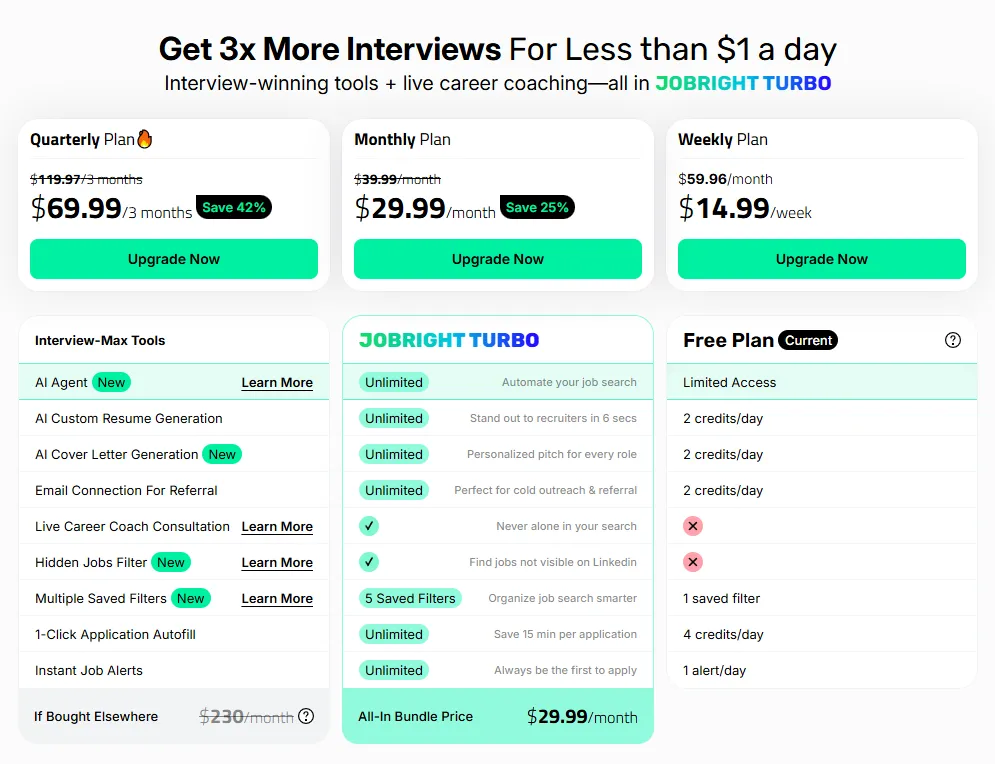
Jobright pushes a "Try for free" model, and an actual no-card-required option does exist (roughly 2 credits/day, basic job tracking, and one daily alert). Paid pricing sits behind the signup flow with a promotional countdown timer at checkout:
- Quarterly Plan: $69.99 / 3 months (save 42%, down from $119.97)
- Monthly Plan: $29.99 / month (save 25%, down from $39.99)
- Weekly Plan: $14.99 / week ($59.96 / month equivalent)
- Free Plan: 2 credits/day, 1 alert/day, 1 saved filter, no card required
Is Jobright AI legit?
Short answer: yes. Jobright is a real, funded company with a working product and a measurable user base. What "legit" means for you is the harder question, and the verifiable trust signals below help answer it.
Jobright AI Inc. with active development, regular release notes, and a public roadmap. Not a shell or affiliate funnel.
100,000+ Chrome Web Store installs, tracked directly by Google. Extension installs cannot be inflated the way review counts sometimes can.
1,708 Trustpilot reviews. Fake-review operations rarely scale past a few hundred entries before Trustpilot flags them, so the volume itself is signal.
The only consistently "scammy" pattern users flag is the checkout countdown timer driving conversions. Billing complaints exist but are at "missed renewal" level, not fraud.
The company is real, the users are real, the money flows through a real US entity. Whether the product works for your specific search is a separate question - 20 minutes on the Free Plan answers it faster than any review will.
What real users say
Trustpilot - strong average, useful minority of negatives

Trustpilot shows 1,708 reviews at 4.8 / 5. The average is genuinely high, so the more useful read is the vocal minority: one-star reviews cluster around "completely useless" AI outputs, unresponsive support, and weak submission tracking. Many five-star reviews are brief and short on workflow detail, which limits their signal. Read the one-star reviews before paying - that is where the operating limits sit.
Reddit - candid, mixed
Reddit threads in r/jobsearch, r/recruitinghell, and r/cscareerquestions are the most candid source of Jobright AI reviews. The sentiment splits cleanly:
- Positive threads cite real time savings on autofill ("saved me 6 hours last week applying to Workday roles") and decent matching for tech-adjacent positions.
- Negative threads hit three patterns consistently: AI-generated resume bullets with hallucinated metrics or invented skills, expired or "phantom" listings still showing as live in the dashboard, and frustration that the AI Agent (full auto-apply) is gated behind a waitlist while being promoted on the pricing page.
Useful search to run yourself: site:reddit.com "jobright ai". Sort by controversial. The heavily-downvoted comments tell you the actual operating limits, not the highlight reel.
Product Hunt - small sample, highly positive
Product Hunt reviews are strongly positive, praising relevance and speed, while repeatedly requesting broader geography and more control over AI outputs. The audience skews early-adopter and tech-friendly, which inflates positivity, but the "what's missing" feedback is specific and worth reading.
Chrome Web Store - adoption signal
The extension shows over 100,000 users at a 4.6 / 5 rating (41 reviews). Autofill tooling is often the "sticky" daily-use component of tools like this. If bypassing repetitive forms is your main goal, that adoption figure is a genuine validation signal.
How to get started
Onboarding is quick. Sign up with email or Google, then set your job preferences: function, job type, location, and work authorization. Be accurate here, vague inputs produce vague matches. Upload your resume in PDF or Word format, the system parses it for job matches and skill gaps.

From there you can browse matches directly, or hand the resume to Orion for an audit before applying. Fix the resume first if it needs work - the AI tailoring layer is only as good as the baseline it edits.

Who Jobright AI is for - and who should skip it
Good fit: high-volume candidates who want to reclaim hours lost to ATS forms, and who are comfortable treating AI as a draft assistant rather than a final author.
Poor fit: anyone searching outside the U.S.; candidates in precision-critical fields (cleared defense roles, regulated resumes) where automation adds unacceptable risk; anyone who needs an outcome-based guarantee rather than standard cancellation.
How to evaluate Jobright AI during a free trial
If you start a trial, test against a structured scorecard rather than a gut feeling:
- Matching accuracy. Take 20 suggested jobs, count how many truly fit, then verify how many are still live on the employer's ATS.
- Tailoring quality. Compare the AI resume to your baseline across 5 applications. Audit for hallucinated skills, tools, employers, or metrics.
- Autofill reliability. Apply to 5 jobs across different ATS systems (Workday, Greenhouse, Lever). Track errors and time saved.
- Tracking fidelity. After submissions, confirm the dashboard status matches what you actually submitted.
- Support responsiveness. File one real ticket and time the reply.
Is Jobright AI worth it?
Jobright AI is a solid application acceleration layer: Chrome autofill plus AI matching, with real Chrome Web Store adoption behind it. If you are searching at high volume, the Free Plan is the right place to start, and the scorecard above is the right way to evaluate it.
The downsides are equally clear: unreliable AI resume outputs on hallucinated metrics, expired listings in the dashboard, and no outcome-based refund. If you can accept manual review of every generated bullet, the trade-off is fair; if not, look for a tool that ships accountability tied to interview results.
Frequently Asked Questions
Is Jobright AI free?
Yes. Jobright offers a real Free Plan with no credit card required: 2 credits/day, basic job matching and tracking, and one daily alert. It is the right place to judge matching quality before paying. Paid plans start at $14.99/week or $29.99/month.
How much does Jobright AI cost in 2026?
Paid tiers run $14.99/week, $29.99/month, or $69.99/quarter (about $23.33/month). Headline prices are promotional and tied to a checkout countdown timer, so confirm renewal rates before committing.
Is Jobright AI legit?
Yes. Jobright is a real US company with active development, 100,000+ Chrome Web Store installs (a metric Google tracks directly and hard to fake), and 1,708 Trustpilot reviews at 4.8 / 5. "Legit" is not the same as "works for you" - spend 20 minutes on the Free Plan to confirm matching quality for your role before paying.
Is Jobright AI's Auto-Apply Agent fully available?
It is listed in the Turbo plan as "Unlimited" and tagged "New," so it is live for paid subscribers, but early-2026 reports describe it as limited in scope and waitlist-gated for some users. Test it on low-stakes applications before relying on it.
What do Reddit users say about Jobright AI?
Reddit sentiment is mixed. Positive threads in r/jobsearch and r/cscareerquestions cite real time savings from autofill and useful matching for tech roles. Negative ones in r/recruitinghell flag AI-generated resume bullets with invented details, expired listings in the database, and frustration that the AI Agent is still in limited release.
Can I cancel Jobright AI and get a refund?
You can cancel through account settings. Jobright offers standard cancellation only, with no refund tied to interview outcomes: if you do not get interviews during your billing cycle, you do not get money back. Note the renewal date at purchase, especially on the quarterly plan.
Focus on interviews, not data entry
JobHire.AI matches you with relevant roles, lets you approve every application before it goes out, and backs it with a 15-day interview guarantee.
Try JobHire.AI ->


